

 Feb 24,2026
When hotel guests step up to your front desk in 2026, they expect a fast, seamless check-in and you expect secure, accurate guest identity verification. The right ID scanner does more than just read passports and driver’s licenses: it integrates with your property management system (PMS), detects fraudulent IDs, automates guest profiles and blacklists, and helps keep your property safe and compliant. This definitive guide helps you find the best hotel-focused ID scanner for your operations, tech stack, and budget.
Why Hotels Need Professional ID Scanners in 2026
Security, Compliance, and Fraud Prevention
Hotels face sophisticated fraud attempts and must comply with regulations like KYC, GDPR, and CCPA. Professional hotel ID scanning, security, background screening, and fraud prevention solutions are now a must for front desks to:
- Help hotels comply with local and international guest registration laws
- Ensure only legitimate guests book and access rooms
Faster, Error-Free Check-in and Enhanced Guest Experience
Manual entry is time-consuming and risks typos. ID scanners instantly capture guest documentation and populate PMS fields, reducing check-in times and enabling more personalized service with less effort.
Chargeback Reduction and Guest Ban (Blacklist) Integration
Scanned identities provide valuable proof of authorization for check-ins, which is crucial in preventing chargebacks and fraudulent claims. Leading systems integrate with guest ban and do-not-rent lists, allowing you to block repeat offenders and boost your property security. Consider tools like ChargeShield or use a free chargeback prevention calculator to benchmark fraud risks and savings.
Key Features to Look For in a Hotel ID Scanner
Document Compatibility (Passports, Driver’s Licenses, Global IDs)
Your scanner should read all common government-issued IDs: US/Canadian driver’s licenses, international passports. Modern devices support multi-country formats so you’re ready for global travelers.
Real-Time Fake ID Detection: UV Scans
Best-in-class scanners use ultraviolet (UV) scan, where the agent can spot suspicious IDs on the spot. These hardware and software authentication features are key for preventing underage/check fraud or unauthorized guest access.
Speed, Ease of Use, and Training Requirements
Look for one-swipe or single-photo solutions with intuitive software, touchscreen prompts, and automatic error correction. Your front desk staff should be able to operate the system confidently within minutes of training.
Data Privacy, Storage, and Legal Compliance
Hotels are subject to regulations like GDPR and CCPA regarding storage, access, and disposal of scanned ID data. Ensure your scanner and vendor support encrypted storage, customizable retention policies, and guest access/deletion requests. This is vital for legal compliance and guest trust.
Types of ID Scanners for Hotels: Match the Device to Your Operation
Top ID Scanners for Hotel Front Desk
 Best All-Around: GuestBan ID Card Scanner
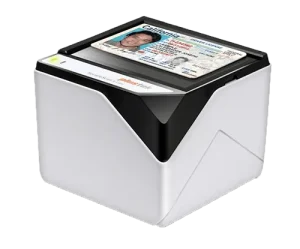 Best All-Around: GuestBan ID Card Scanner
- Reads US & Canadian driver’s licenses; lightning scan speed
- Guest ID detail transfer with Oracle OPERA, Synxis, Hotel Key, PEP and other leading PMS
- Real-time UV Scans for fake ID detection
- Used by major international chains and boutique groups
- Networked for multi-desk, multi-location blacklist/ban syncing
- Small front desk footprint
Best Passport + ID Card Scanner: GuestBan Passport/ID Scanner
- Optional Upgrade UV document scanning
- Large in size
- One-swipe read, with high accuracy even in low light
- Ideal for properties prioritizing fraud and blacklist integration
- Networked for multi-desk, multi-location blacklist/ban syncing
- Guest ID detail transfer with Oracle OPERA, Synxis, Hotel Key, PEP and other leading PMS
Hotel Implementation Roadmap: Integrating an ID Scanner System
Pre-Implementation Checklist: Compliance, Workflow, and Staff Buy-in
- In the United States, there are no laws preventing you from scanning IDs
- Certain counties require you scan ID’s or ensure you are getting full guest details include date of birth.
- GuestBan automates your front desk workflow: from scans, alerts, and who has access to ID scan records for security compliance.
Hardware Setup and Software Integration Steps
- Pick a scanner of choice, typically if you do not have many passport guest we recomend GuestBan ID Scanner for the small form factor.
- Install scanner
- GuestBan performs the installation and helps connect to your PMS.
- Set your access requriments who can access ID scans and what access permissions have been granted.
- Setup Desktop, Email, Audio for Do Not Rent List alerts.
Ongoing Maintenance, Updates, and Support
- Run periodic software updates
- Monitor compliance with audit logs and purge outdated scan data
Using Guest Ban and Do-Not-Rent Lists (Chargeback Prevention)
Once your system is live, sync scanned IDs with cloud-based ban/blacklist systems. Immediately flag bad actors, high-risk chargebacks, or banned guests at check-in. For a deep dive into the process, explore Innstrata’s GuestBan. See also Preventing Chargebacks with ID Scanning.
Case Study: ID Scanner Impact on Hotel Security and Guest Experience
Before & After: Staff Efficiency Metrics
A 65-room branded hotel implemented GuestBan ID scanning at check-in. Average check-in times dropped from 5 minutes per guest to under 2 minutes. Staff reported higher confidence in data accuracy and reduced need for manual corrections.
Guest Incident Reduction
In the six months post-deployment, guest related incidents dropped by 90%. The impact was immediate. Bad actors and individuals using fake identities stopped showing up. Knowing they’d have to present a scannable ID reduced the sense of anonymity and deterred problematic behavior.
Guests who did check in were better behaved, understanding that their ID was on file. This sense of accountability significantly reduced late-night disturbances and vandalism. If anyone refused to show ID, they simply couldn’t rent a room, giving staff clear authority to enforce the policy.
Guest Feedback and Loyalty Program Enrollment
The hotel became safer and more welcoming. Police visits dropped, and the property’s image improved. Guests felt more secure, and staff had greater peace of mind. Guests gave positive feedback on the fast, check-in. Nearly 30% opted into loyalty programs since their ID/profile was automatically linked and pre-filled.
Improved Reputation and Revenue Growth
The ripple effect was clear: negative reviews stopped, and positive feedback increased. The hotel’s online ratings improved, attracting more bookings from safety-conscious travelers.
Guests who enjoyed their stay were more likely to return, boosting occupancy. Fewer damages and chargebacks improved profitability.
Interestingly, hotels using GuestBan started outperforming nearby ones that didn’t. Most law-abiding guests appreciated the added security and felt reassured. In today’s market, where safety is a top priority, the enhanced ID policy became a competitive advantage.
Frequently Asked Questions
Which software is used in hotel front office?
Popular property management systems (PMS) include Oracle OPERA, Syxis, HotelKey, and AutoClerk. Many integrate with GuestBan professional ID scanning hardware and software.
What do hotels do with scanned guest IDs?
Hotels use scanned IDs for guest verification, fraud prevention, and to expedite check-in. Data may be stored for legal compliance or chargeback protection. Leading systems sync this data to reservation records, always in line with GDPR/CCPA policy requirements.
Can ID scanning help prevent chargebacks in hotels?
Yes. Scanned ID records, especially when linked to reservation and payment data, provide essential evidence to dispute fraudulent chargebacks. Integrated systems can also flag banned guests before arrival. Explore ChargeShield or review the 8 Steps on How to Prevent Chargebacks in Hotels guide.
What are the legal/privacy issues of storing guest ID data?
Hotels must comply with privacy laws (like GDPR and CCPA). This includes limiting and encrypting ID data storage, providing hotel with access/deletion on request, and minimizing excessive retention. Not storing scanned ID data on the front desk PC for data security.
What’s the difference between hotel and bar/nightclub ID scanners?
Hotel systems emphasize PMS integration, support for international passports, data retention compliance, and blacklist connections. Bar/nightclub scanners often focus narrowly on age verification and speed, without hospitality workflow integration or data privacy controls.
Conclusion: Choosing the Right ID Scanner for Your Hotel’s Needs
The best ID scanner for your hotel isn’t just a device: it’s part of a system that protects your business, delights your guests, streamlines staff work, and ensures compliance. Whether you run a boutique inn, a major resort, or a high-tech flagship, matching scanner type, integration, fraud detection, and budget to your specific needs is key. For a complete hospitality tech ecosystem, discover more Hotel Technology Tips.